
August 4, 2026
Integration & data Automation & AI
Integration between webshop and accounting system: benefits, possibilities, and common pitfalls
When a webshop gets more than a few orders a week, manual administration quickly becomes a burden. An integration between webshop and accounting system can save time and remove errors — but it is rarely as simple as it looks.

When a webshop starts getting more than a few orders a week, the manual administration quickly becomes a bigger job than you first imagined. Orders have to be booked, payments reconciled, credit notes created, stock adjusted, and customer data perhaps moved between several systems.
This is exactly where an integration between the webshop and the accounting system can make a noticeable difference.
A well-functioning integration does not just save time. It can also reduce errors, give a more precise financial overview, and make it easier to scale the business. But integrations are not always as simple as they look in a sales pitch. An order is not necessarily the same as a payment, a refund is not always a simple credit note, and different systems can handle VAT, discounts, shipping, and stock in very different ways.
In this guide I go through what a webshop integration can typically automate, which solutions exist, and which pitfalls you should know before you put anything into production.
What does integration between webshop and accounting system mean?
An integration makes the webshop and the accounting system exchange data automatically. Instead of an employee manually copying information from one platform to the other, data is transferred according to some predefined rules.
For example, a paid order in WooCommerce or Shopify can automatically be created as an invoice in e-conomic, Dinero, Uniconta, or another accounting system. The customer can be created at the same time, line items can be booked to the right accounts, and VAT can be registered correctly.
It sounds simple, but the word “integration” covers many different levels. Some solutions only send the day’s total revenue to the accounting system. Others transfer every single order, update stock both ways, and handle refunds, fees, and credit notes.
So the first question is not just whether the systems can be integrated. The right question is: which data should be moved, when should it happen, and which system decides?
The key benefits of a webshop integration
Less manual work
The most visible benefit is the time saved. Without an integration, orders often have to be exported, checked, and booked manually. That may be manageable at ten orders a month, but it quickly becomes a bottleneck when the order volume grows.
Automation can free up time from repetitive administration, so the business can spend its resources on customers, products, and sales instead.
Fewer typos and duplicates
When data is moved manually, errors happen. An order number is typed wrong, a customer is created twice, or a product is booked with the wrong VAT code.
An integration does not remove all errors, but it reduces the risk of the classic human mistakes. At the same time the process becomes more consistent, because the same rules are applied to every order.
More continuous and precise bookkeeping
If orders are only booked at the end of the month, the accounting system is not an accurate picture of the current business. With an integration, sales can be registered continuously, so the company’s financial overview stays more up to date.
That makes it easier to follow revenue, VAT, receivables, and product groups without first gathering data from several different spreadsheets.
Better ability to scale
A manual process grows almost in step with the number of orders. An automated process, by contrast, can often handle a far larger order volume without a corresponding increase in administrative hours.
That does not mean the integration never needs maintenance. But it means the business does not have to hire an extra employee just to copy data between systems.

Which data can typically be synchronised?
A webshop and an accounting system contain several types of data, and it is rarely necessary to synchronise all of them. A good solution starts from the business’s actual workflows.
Orders and invoices
The most common integration transfers orders from the webshop to the accounting system. Depending on the setup, the order can be created as a draft, a booked invoice, or a summarised entry.
It is important to decide when the transfer should happen. Should it be when the order is created, when the payment is approved, when the goods are shipped, or only when the order is completed?
The right moment depends among other things on the payment method, the delivery process, and accounting practice.
Customers
Customer data can be created or updated automatically. That can be name, address, email, phone number, company name, and VAT number.
Here you should consider whether every webshop customer really needs to be created as a separate debtor. For many B2C webshops it can be more practical to book cash sales in bulk or use a shared webshop debtor, while B2B customers are created individually.
Products and item numbers
Products can be synchronised with name, item number, price, VAT code, and account. In more advanced solutions, product data can be maintained in the accounting system or a separate product information system and then sent to the webshop.
The item number, often called the SKU, is normally the most important key. If the same product has different item numbers in the two systems, error-free synchronisation becomes difficult.
Stock levels
Stock can be updated from the accounting system to the webshop, from the webshop to the accounting system, or both ways. Two-way synchronisation sounds best at first, but it requires clear rules for which system is the authoritative source.
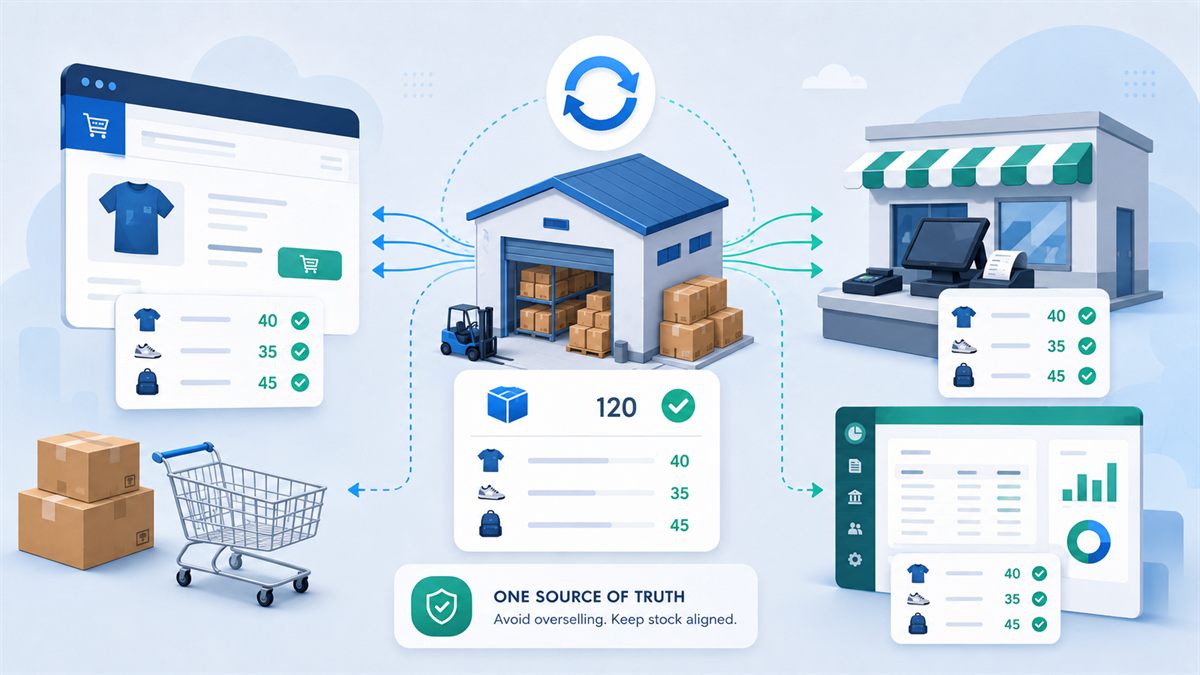
If the stock is also used by a physical store, a warehouse management system, or several webshops, having one shared truth becomes even more important. Otherwise you risk overselling or stock counts that keep overwriting each other.
Payments, fees, and payouts
An order of 1,000 kroner does not necessarily mean 1,000 kroner lands in the bank account. The payment provider can deduct transaction fees, bundle several orders into one payout, and subtract refunds.
So the integration should not only account for the sale. It also has to fit the way payments are reconciled.
Refunds and credit notes
A full refund is often relatively simple. Partial refunds, returns of individual line items, changed shipping, and exchanges are more complex.
It should be clear whether a refund in the webshop should automatically create a credit note in the accounting system, and what happens if the credit note has already been created manually.
Three common ways to integrate the systems
Standard plugin or app
The fastest solution is often an existing plugin or app that already supports both the webshop and the accounting system.
The advantage is that the solution is typically well-tested, quick to install, and cheaper than custom development. There will often be a control panel where accounts, VAT codes, and order statuses can be mapped.
The disadvantage is that the business has to adapt to the options the vendor has built. If your order flow, discount structure, or stock logic deviates from the standard, the solution can fall short.
Integration platform or middleware
An integration platform acts as an intermediary between the systems. It fetches data from the webshop, processes it, and passes it on to the accounting system.
This type of solution often gives greater flexibility than a single plugin. You can, for example, create rules for different countries, stores, product groups, or payment methods.
In return you get one more system to monitor. If data fails midway through the flow, it must be possible to see why and re-run the transfer without creating duplicates.
Custom-built API integration
A custom-built integration is built directly for the business’s workflows and the systems’ APIs.
It is relevant when standard solutions cannot handle the process, or when the integration is business-critical. That can be a B2B webshop with customer-specific prices, several warehouses, credit limits, special invoicing rules, or data from an ERP system.
A custom solution requires a larger investment and ongoing maintenance. In return, it can be designed so employees do not have to invent manual workarounds around the system.
What should a good order flow look like?
There is no single correct flow for all webshops. A typical process can, however, look like this:
- The customer completes the order in the webshop.
- The payment is reserved or completed at the payment provider.
- The order gets a specific status in the webshop.
- The integration validates customer, order, and product data.
- The order or invoice is created in the accounting system.
- The accounting system’s voucher or invoice number is saved back onto the webshop order.
- When the order is shipped, the payment is captured according to the applicable rules.
- Any refunds create a credit note and are included in the reconciliation.
- Errors are placed in a queue so they can be corrected and re-run.
The crucial thing is that every step can be traced. An employee has to be able to open an order and see whether it has been transferred, which voucher it corresponds to, and why it may have failed.
An integration that works in secret without logging can run fine for months. When it fails, however, troubleshooting becomes both slow and expensive.
Payment reconciliation is often the hard part
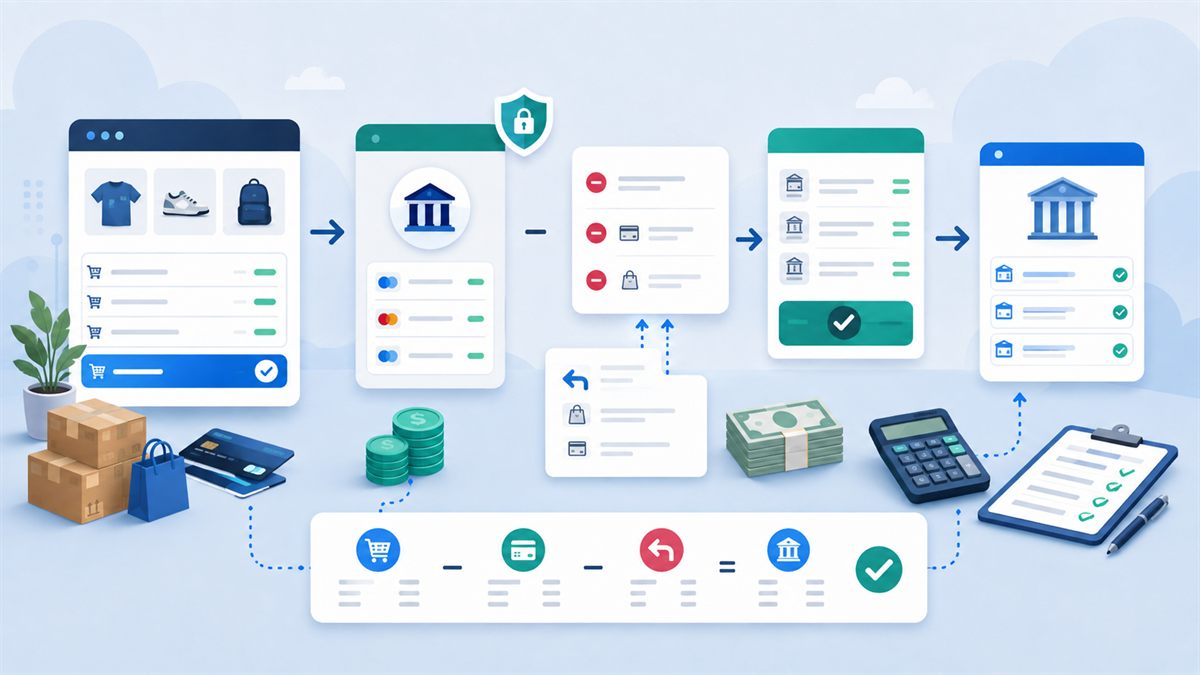
Many focus on getting the order into the accounting system. In practice, payment reconciliation is often at least as important.
The webshop may register ten paid orders in one day, while the payment provider sends one bundled payout two days later. From the payout, fees have been deducted, and an earlier order has been refunded.
If the integration simply books each order directly to the bank account, the bank does not match the accounts. You need a clearing account for the payment provider so the sales, the fees, and the final payout can be matched correctly.
The same applies with several payment methods. Card payment, MobilePay, bank transfer, invoice, and buying on credit can require different bookkeeping flows.
It is therefore a good idea to involve the company’s bookkeeper or accountant before the integration is set up. The developer can build the data flow, but the chart of accounts, VAT treatment, and reconciliation method have to fit the company’s accounts.
VAT, countries, and currency make the integration more complex
A Danish webshop with Danish private customers is relatively simple. The complexity increases when the webshop sells to businesses, other EU countries, or countries outside the EU.
The integration has to be able to distinguish between, among other things:
- Danish VAT and any foreign VAT rates
- sales to private individuals and businesses
- customers with and without a valid VAT number
- sales inside and outside the EU
- different currencies and exchange rates
- shipping, fees, and discounts with correct VAT handling
It is not enough that the total amount on the invoice looks right. The sale also has to land on the right accounts and VAT codes, so VAT reporting and accounts are correct.
The webshop should therefore provide clear information about country, customer type, currency, and tax basis. The integration then has to translate the information into the structure the accounting system expects.
Inventory management needs a clear source of truth
When both the webshop and the accounting system can change the stock, the question arises: who decides?
Imagine the webshop shows ten items in stock. An employee changes the stock to eight in the accounting system at the same time, while two new orders are completed online. If the systems simply send stock counts back and forth, a delayed update can overwrite the correct number.
A robust integration therefore works with stock movements, timestamps, or a clearly defined master. It can, for example, be the accounting system or the warehouse management that owns the stock count, while the webshop only shows the latest known level.
With several sales channels, all channels should as far as possible use the same central stock. Otherwise the same product can be sold on two platforms, even though there is only one item on the shelf.
Typical pitfalls with webshop integrations
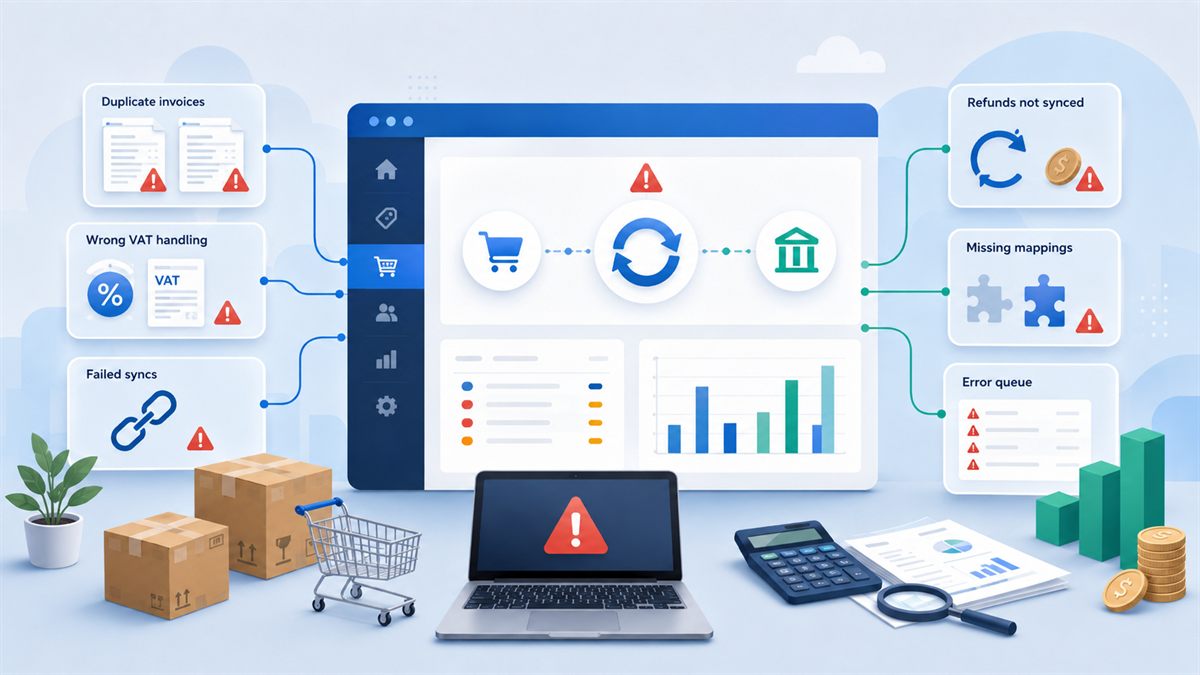
Unclear responsibility between the systems
One of the most common mistakes is that no one has decided which system owns which data.
Should product names be changed in the webshop or the accounting system? Where are new customers created? Who decides the stock? May an invoice be edited after transfer?
These decisions should be written down before the integration is developed or configured.
Wrong mapping of products and accounts
If products do not have stable item numbers, the integration cannot always identify them correctly. The same applies to bookkeeping accounts, VAT codes, shipping products, and discount lines.
Good preparation with a clean-up of product data can save many hours of troubleshooting later.
Duplicates on re-run
Network errors and temporary API errors will happen. The critical question is what the integration does afterwards.
If the same order is sent again, it must not create another invoice. The integration should be idempotent, which in practice means that the same event can be processed several times without creating multiple identical vouchers.
Missing handling of order statuses
A webshop order can be created, awaiting payment, processing, shipped, cancelled, or refunded. If all orders are transferred immediately, the business risks booking orders that are never paid.
The statuses have to be mapped to concrete actions. This is especially important with bank transfer, invoice payment, backorders, and manual orders.
Discounts, gift cards, and shipping handled incorrectly
A discount is not always just a negative amount. It can be distributed across several VAT rates or tied to specific products. Gift cards can also require different accounting treatment than ordinary sales.
Shipping can have its own account, VAT code, and product line. If these special line types are not thought through, the total amount may add up while the bookkeeping is still wrong.
Refunds fall outside the standard flow
Many integrations are tested with a normal purchase, but not with the situations that cause problems in everyday life: partial refund, exchange, cancellation after invoicing, or the return of one out of five items.
Always test the awkward scenarios before the integration goes into production.
Errors are discovered too late
If no one is notified about failed transfers, weeks can pass before you discover that invoices are missing.
There should be a clear error log and preferably an automatic notification on critical errors. At the same time, a failed order must be able to be re-run safely after the cause has been fixed.
The integration’s limitations are not documented
Even a good integration has limits. Perhaps it does not support several currencies, composite products, or changes after invoicing.
The limitations should be documented, so employees know when they can trust the automation and when a manual process is necessary.
Security and personal data get overlooked
An integration often gets access to customer information, orders, and financial data. API keys and access tokens must be stored securely, and the integration should only have the permissions it actually needs.
It should also be clarified who runs the intermediary, where data is processed, and how access is closed if the vendor or the employee should no longer have access.
How to prepare the project
Before you choose a plugin or order custom development, you should map the current process.
Start by taking three to five real orders and follow them all the way from webshop to bank and bookkeeping. Include both a normal order, an order with a discount, a refund, and preferably a foreign order.
Then answer these questions:
- When should an order be booked?
- Should every customer be created as a debtor?
- Which system owns products, prices, and stock?
- How should shipping, fees, and discounts be booked?
- How are partial refunds handled?
- How are payouts from the payment provider matched?
- Who should be notified when a transfer fails?
- How long should log data be kept?
- What should the employee be able to correct and re-run?
- Who maintains the integration when a system changes?
Once the answers are in place, it becomes far easier to assess whether a standard solution is sufficient.
Standard solution or custom development?
A standard integration is often the right choice for an ordinary webshop with a simple order flow. There is no reason to custom-build something that already exists in a stable and well-documented solution.
Custom development becomes relevant when the integration has to support processes that are crucial to the business and that the standard solution cannot handle without many manual workarounds.
That can be the case with:
- several webshops with shared stock
- B2B sales with customer-specific prices
- several companies or sets of accounts
- subscriptions and recurring payments
- advanced return and credit flows
- integration with accounting system, warehouse, and shipping alike
- custom products, configurations, or production orders
- large volumes of data and a need for detailed monitoring
The best solution is not necessarily the most advanced one. It is the one that handles the business’s most important scenarios reliably and makes errors visible when they occur.
What does an integration cost?
The price depends less on the number of systems than on the complexity of the process.
A simple standard integration can often be set up with a subscription, configuration of accounts, and a thorough test. A custom-built solution requires analysis, development, testing, operation, and ongoing adjustments when the webshop’s or the accounting system’s API changes.
It is important to calculate the total economy. A cheap integration can become expensive if employees have to fix errors manually every week. Conversely, it rarely makes sense to build a large custom solution for a webshop with few and simple orders.
Look at how many hours are spent today, how expensive the errors are, and how much the order volume is expected to grow. That gives a more accurate basis for the decision than only comparing monthly subscription prices.
An integration also has to be maintained after launch
A webshop integration is not a project you can necessarily forget after go-live.
The webshop gets updates. Plugins change data formats. The accounting system’s API gets new versions. The business perhaps adds a new payment method or starts selling to a new country.
So the integration should have a responsible owner and a plan for monitoring, updates, and testing. Critical flows should be tested again after major changes in the webshop, payment solution, or accounting system.
It is also an advantage to have a simple operating procedure: where do you see errors? Who fixes them? How is an order re-run? And who is contacted if the integration stops entirely?
Conclusion: a good integration starts with the workflow
Integration between webshop and accounting system can remove a large part of the manual administration and create a better financial overview. But it takes more than just installing a plugin and entering an API key.
The best solutions begin with an understanding of the business’s order flow, payments, VAT, stock, and exceptions. Only then do you choose the technical solution.
For a smaller webshop, a standard integration can be exactly what is needed. For a business with several sales channels, special B2B processes, or advanced inventory management, a tailored integration can be a better investment.
The most important thing is that the solution is transparent. You have to be able to see what has been transferred, spot errors quickly, and re-run data without creating duplicates.
Shall we look at your webshop?
If you have a WooCommerce webshop or a custom-built solution and are unsure how best to connect it to your accounting system, I am happy to help map the flow and assess whether a standard integration is enough, or whether a tailored solution is needed.